
How-to guide
Body weight
Log a weigh-in whenever you step on the scale, watch the trend, and fix a number you got wrong. Weigh-ins are free.
-
Log a weigh-in
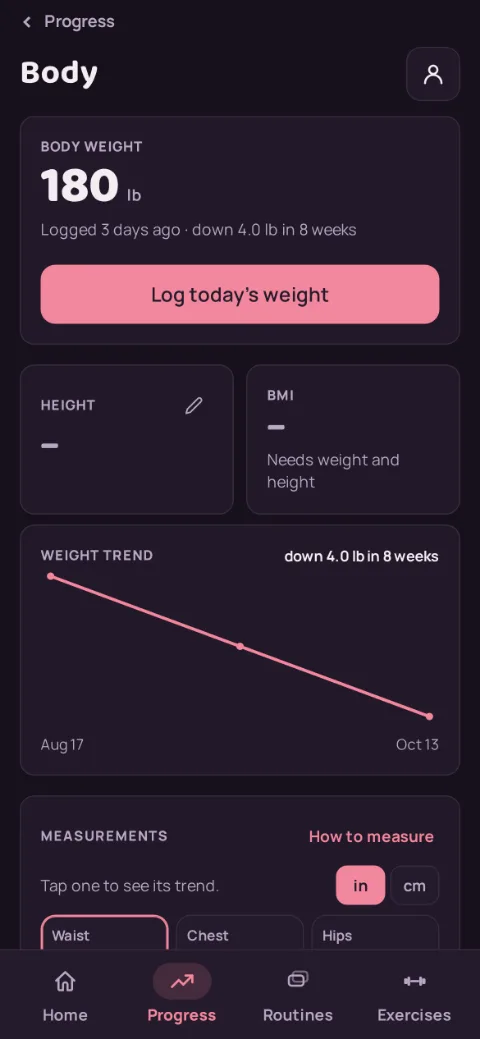
On the Progress tab, tap Body weight. The first time, enter your weight (and your height if you like) and save. After that, tap Log today's weight, type the number, pick lb or kg, and tap Save. If the number is far from your last one, RepBunny asks whether it's a typo before saving.
-
Read the trend
The big number is your latest weigh-in, with how long ago you logged it and how much it changed. The Weight trend chart appears once you have 2 weigh-ins. It shows every weigh-in over time, in the unit of your latest one.
-
Fix or delete a weigh-in
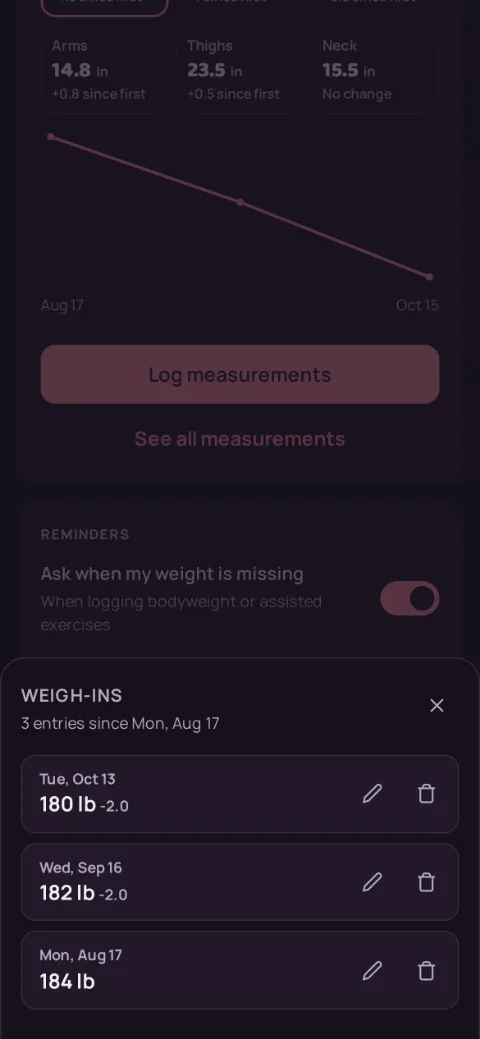
Tap See all weigh-ins. Every weigh-in is listed, newest first, with its change from the one before. Tap the pencil to change the weight, unit, or date, or the bin to delete it.
-
What uses your weigh-in
Your latest weigh-in feeds Strength levels, the Bodyweight and Assisted load types (so push-ups, pull-ups, and assisted machines count toward volume), and, if you have no related lifts yet, the starting weight Premium suggests for a new exercise. Change a weigh-in and they all follow.
To stay on top of it, switch on a weekly or monthly Weigh-in reminder at the bottom of the screen. You can also turn off the Ask when my weight is missing prompt there.
Still stuck?
Email hello@repbunny.app and tell us what happened. A screenshot helps.
Get RepBunny
On Google Play now. iPhone coming soon.
Get it onGoogle Play