
How-to guide
Bring your workouts from Strong or Hevy
Switching apps doesn’t mean starting over. Import your past workouts and your records, “last time”, and progress charts pick up where you left off. The file is read on your phone and never uploaded.
53-second clip, with sound
Import a Strong export
- Tap the person icon, then Your data, then Import from another app.
- Pick the app, tap Choose file, and pick your export.
- Tap Yes, same one on each right match, then Import.
- Pick lb or kg and tap Import again.
-
Export from your old app
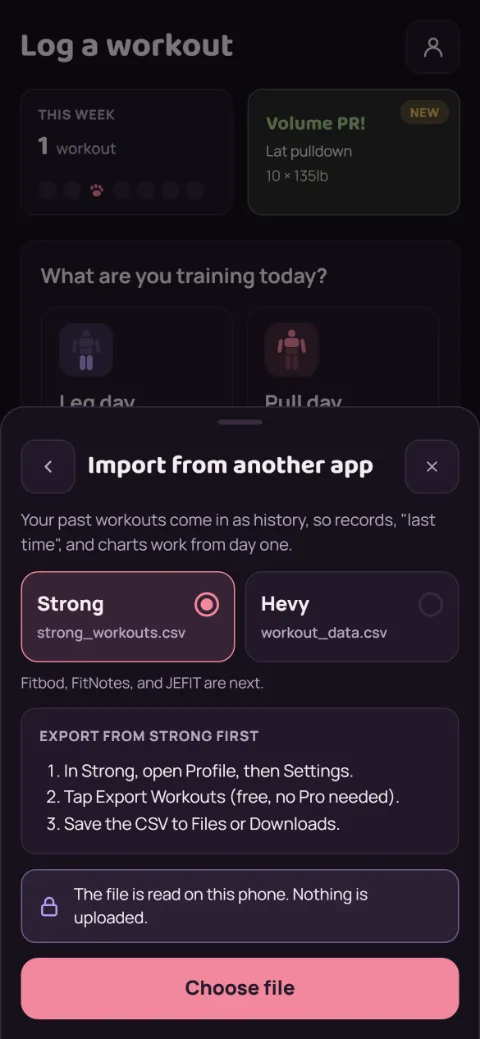
In Strong: Profile, then Settings, then Export Workouts. In Hevy: Profile, then Settings, then Export & Import Data, then Export Workouts. Both are free. Save the CSV file to Files or Downloads.
-
Pick the app and the file
In RepBunny, tap the person icon at the top right, then Your data, then Import from another app. Choose Strong or Hevy, tap Choose file, and pick the CSV.
Finish any workout in progress first. Importing waits until you do.
-
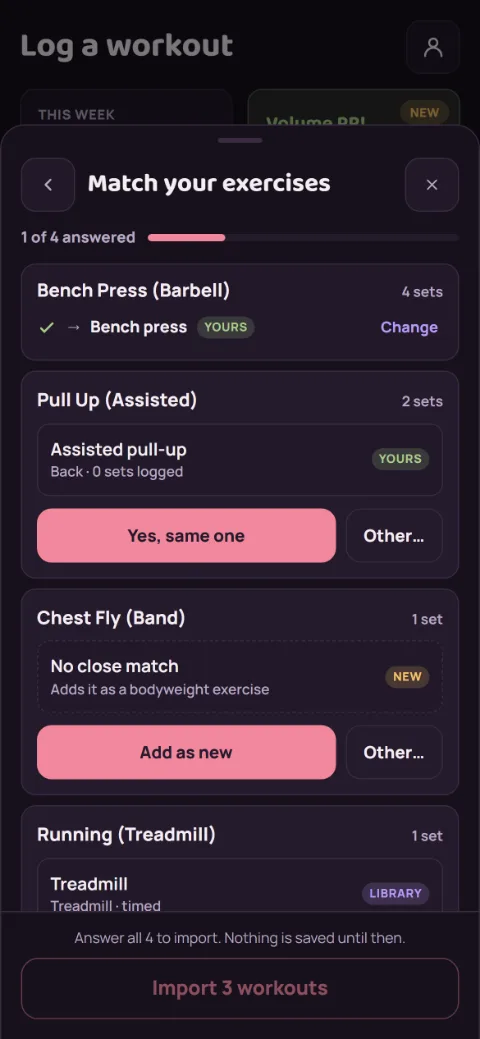
Match your exercises
Each exercise in the file gets one row, with RepBunny’s best guess. Your own exercises come first, then the library. Tap Yes, same one if the guess is right, or Other… to search or add it as a new exercise.
Nothing is saved until every row has an answer. RepBunny remembers your answers, so a newer export from the same app goes straight to the last step.
-
Check it and import
You’ll see how many workouts and sets come in. Warm-up sets are left out unless you turn on Keep warm-up sets, so they don’t count as records. If the file doesn’t say lb or kg, pick the one you logged in.
Tap Import. Nothing already in RepBunny is changed or deleted, and a workout you already have (same day, same sets) is skipped, so importing the same file twice adds nothing.
Still stuck?
Email hello@repbunny.app and tell us what happened. A screenshot helps.
Get RepBunny
On Google Play now. iPhone coming soon.
Get it onGoogle Play